Reclaim Your Disk Space
When you delete a heavy game, you think you've freed up space. But it's an illusion. Game launchers quietly hoard hidden shader caches and residual files on your system drive for years—in mysterious folders named with random ID numbers.
Free to use — cleans up to 5 items per run. A licence key removes the limit.
Uninstalling a game does not remove everything. Steam and Epic keep shader caches, Workshop mods, Proton prefixes and download leftovers in folders named by number — often tens of gigabytes. Vapor Storage Manager matches those folders back to real game names, shows exactly what is safe to delete, and repairs launcher records that make a game look installed when its files are gone. Windows, Linux and SteamOS. Free to use with a limit of 5 items per clean; a licence key lifts the limit.
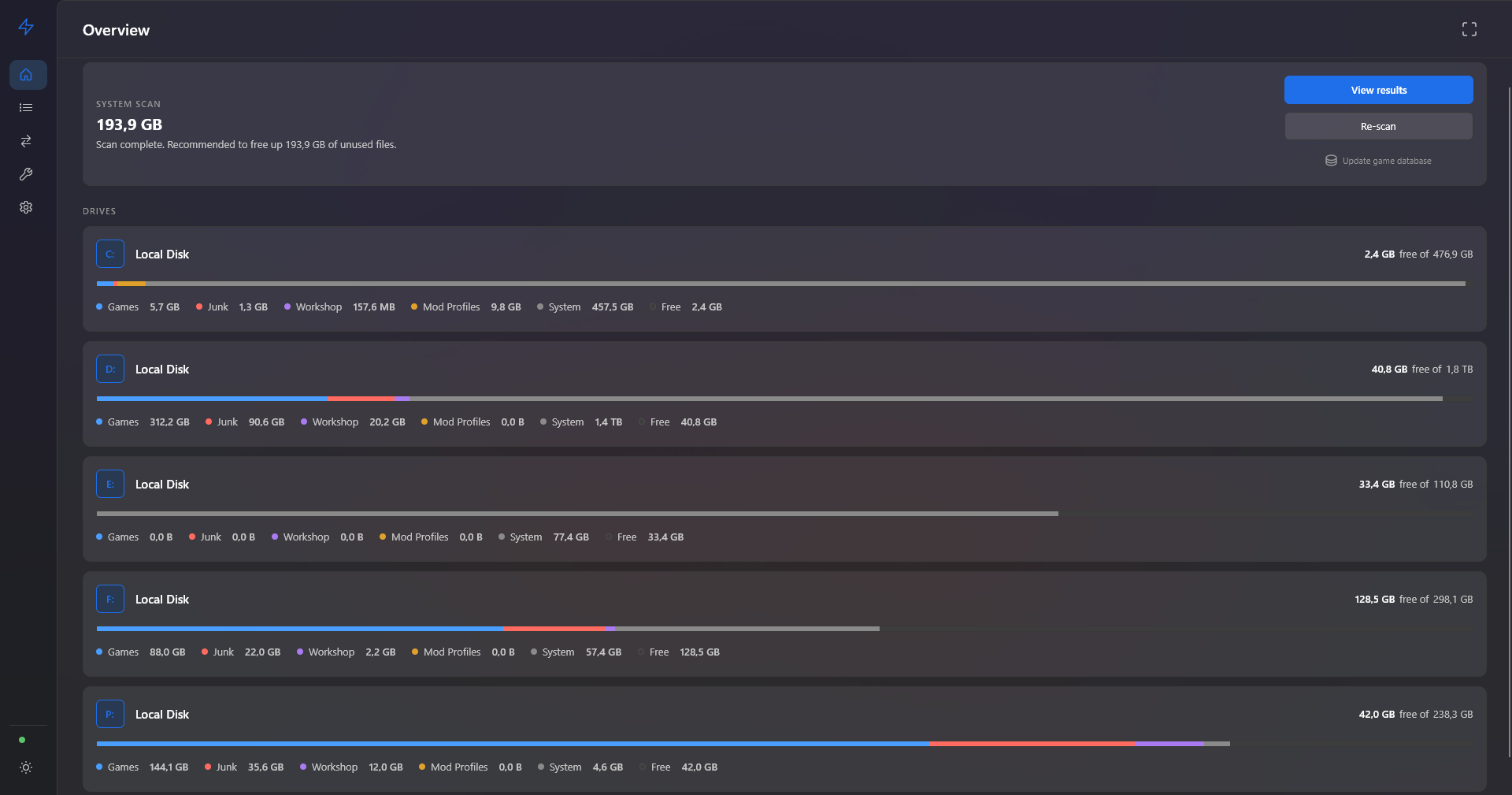
Rebuilt from the ground up: a single window, a navigation rail instead of stacked dialogs, and a results list that stays smooth at thousands of entries.
The Illusion of Free Space
Vapor Storage Manager is a utility created by gamers, for gamers, that takes all the routine upon itself. It matches hidden folders with real game names and safely deletes these "digital ghosts," returning dozens of gigabytes for new playthroughs.
How It Works
Scan
The utility scans your system for hidden caches and residual files.
Review
You see exactly what can be deleted, with real game names attached.
Clean
One click safely removes the junk, freeing up dozens of gigabytes.
Main Features
Digital Ghost Detector
Instantly find and delete gigabytes of junk from Steam and Epic Games you uninstalled months ago.
Steam Workshop Cleanup
Finds Workshop mods for already deleted games, retrieving their real names directly via Steam API.
GPU Shader Cache
Safely deletes DirectX and Vulkan shader caches for NVIDIA, AMD, and Intel. 100% safe to delete.
Mod Manager Cleanup
Finds residual download archives and profiles from Mod Organizer 2, r2modman, Vortex, CurseForge, and others.
Partial SupportSave Data Security
Strictly separates graphical junk from local game saves.
Built for Handhelds
Indispensable for Steam Deck, ASUS ROG Ally, and Lenovo Legion Go owners.
In DevelopmentFeatherlight
No background processes. Just a few megabytes.
Fixes, Not Just Space
Some problems are not "too much disk used" but "something is broken". A launcher keeps its own record of what is installed, and that record drifts out of step with the files on disk. The Fixes screen finds those cases and repairs them — it scans first and shows exactly what it found, and nothing is touched until you select it.
Ghost installs
Steam keeps a manifest file for every installed game. Delete a game folder by hand, or interrupt an install, and the manifest stays behind — Steam still shows the game as installed, and Play fails. This finds those manifests and removes them. Nothing holding actual game data is touched.
Workshop content for uninstalled games
Uninstalling a game frees its own files but leaves the Workshop items you subscribed to. A 20 GB game with 80 GB of mods gives back only 20 GB. This finds Workshop content for games that are no longer installed anywhere.
Proton prefixes of removed games
Every Windows game run through Proton gets its own fake C: drive under compatdata — usually a few hundred MB, sometimes several GB. Uninstalling the game leaves it behind. Only prefixes whose game is no longer installed are listed.
Abandoned downloads
Cancelled or interrupted installs leave data in steamapps/downloading. When the game is no longer tracked by Steam the download can never resume and the bytes stay forever.
Missing library folders
Steam still lists a library on a drive that is no longer there. It keeps offering that location when you install, reports “not enough space” while space is free, and fails updates for games that lived on it.
Steam cache (appcache, depotcache)
The standard cure for downloads that will not start, stall, or hang at “unpacking”. Steam rebuilds both folders on next launch. Only these two are touched — deleting anything else in the Steam folder can stop Steam from starting.
Steam client scratch (htmlcache, dumps, temp)
htmlcache backs the store and library pages — a stale one is the usual reason the store loads blank or shows old prices. dumps collects a crash dump every time the client falls over. steamapps/temp is where installs are unpacked, and a cancelled one can leave a copy as large as the game.
Ghost installs
The launcher records every installed game as a .item file. Delete a game folder by hand and the file stays — Epic keeps showing the game as installed. Removing the manifest is what makes the launcher let go.
Download
The same build for everyone. Use it free with a 5-item limit per clean, or enter a licence key to unlock it fully — no separate installer, no reinstall.
No account required. No telemetry. Portable — unpack and run.
Tell me when it's out
Leave your email and we'll write once, on release day. No newsletter.
Clean Your System Forever
Forget about manually searching for hidden folders. Choose your plan:
Personal plans cover personal use. A company or other organisation needs the business plan.
Lost your license key?
The key is emailed once, right after your purchase. If you can no longer find that email, contact us with the email address you paid with and your order number, and we will sort it out.
Contact support